Note
Go to the end to download the full example code
Frontiers: Copper Particle in Viscous Oil
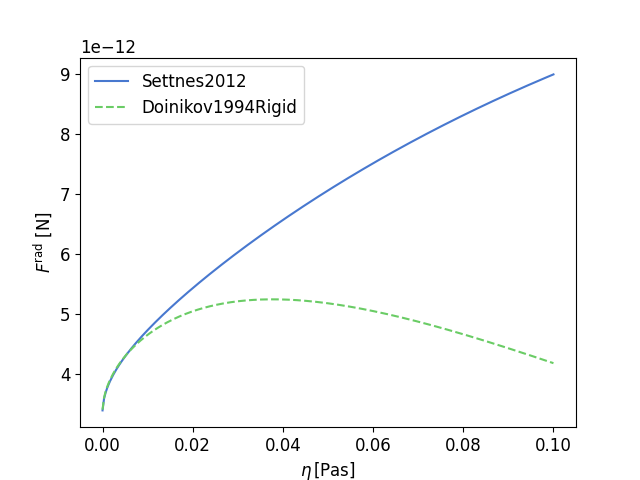
This example corresponds to section 3.3 in our publication. In this example we study the acoustic radiation force (ARF) on a copper particle suspended in a viscous oil. We compare the theory by Doinikov (rigid, 1994) and the theory by Settnes & Bruus (2012).
As always we start off by importing the necessary Python modules. For our example we are going to need the osaft library, and the packages NumPy and Matplotlib.
18 import numpy as np
19 from matplotlib import pyplot as plt
20 from matplotlib.patches import Circle
21
22 import osaft
The next step is to define the properties for our example, these include the material properties, the properties of the acoustic field and the radius. We always assume SI-units.
The wave type is set using the osaft.WaveType enum. Currently, there are
two options:
osaft.WaveType.STANDING and osaft.WaveType.TRAVELLING for a plane
standing wave and a plane travelling wave, respectively.
34 # --------
35 # Geometry
36 # --------
37 # Radius
38 R_0 = 5e-6  # [m]
39
40 # --------------------
41 # Properties of Copper
42 # --------------------
43 # Speed of sound
44 rho_cu = 8_930  # [m/s]
45 # Density
46 c_cu = 5_100  # [kg/m^3]
47
48 # -------------------
49 # Properties of Oil
50 # -------------------
51 # Speed of sound
52 c_oil = 1_445  # [m/s]
53 # Density
54 rho_oil = 922.6  # [kg/m^3]
55 # Viscosity
56 eta_oil = 0.03  # [Pa s]
57 zeta_oil = 0  # [Pa s]
58
59 # --------------------------------
60 # Properties of the Acoustic Field
61 # --------------------------------
62 # Frequency
63 f = 5e5  # [Hz]
64 # Pressure
65 p_0 = 1e5  # [Pa]
66 # Wave type
67 wave_type = osaft.WaveType.STANDING
68 # Position of the particle in the field
69 position = np.pi / 4  # [rad]
70
71 # Once all properties are defined we can initialize the solution classes.
72 # In this example, we use the classes ``osaft.doinikov1994rigid.ARF()``, and
73 # ``osaft.settnes2012.ARF()``.
74
75 doinikov = osaft.doinikov1994rigid.ARF(
76     f=f, R_0=R_0,
77     rho_s=rho_cu,
78     rho_f=rho_oil, c_f=c_oil,
79     eta_f=eta_oil,
80     zeta_f=zeta_oil, p_0=p_0, wave_type=wave_type,
81     position=position, long_wavelength=True,
82 )
83
84 settnes = osaft.settnes2012.ARF(
85     f=f, R_0=R_0,
86     rho_s=rho_cu, c_s=c_cu,
87     rho_f=rho_oil, c_f=c_oil,
88     eta_f=eta_oil,
89     p_0=p_0, wave_type=wave_type,
90     position=position,
91 )
Next, we want to compare the boundary layer thickness and the particle radius for the given parameter. Both quantities are properties of our solution classes and can easily be evaluated, and we can compute the ratio.
97 print(f'{settnes.delta / settnes.R_0 = :.2f}')
settnes.delta / settnes.R_0 = 0.91
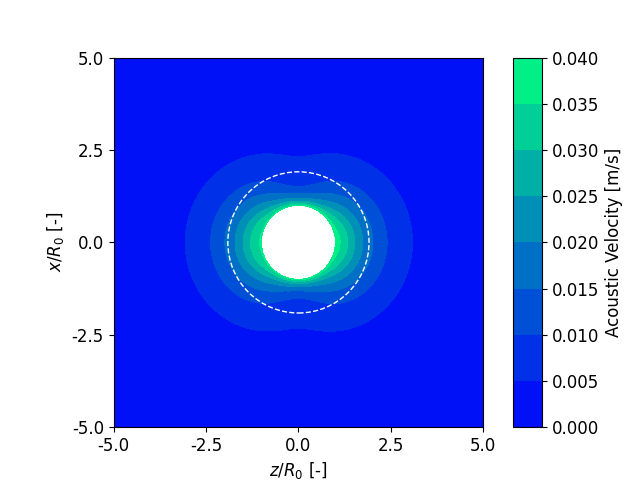
With the model from Doinikov it is also possible to compute the scattering
field. To plot the scattering field we need to initialize a
osaft.FluidScatteringPlot() instance.
The class takes the model as an argument and the radius range r_max that
is plotted. For more options see the documentation.
The method plot() will then generate the plot.
As always with Matplotlib, we need to call plt.show() to display the
plot.
plot() returns two Matplotlib objects, a Figure and an Axes
object.
These can be used to further manipulate the plot and to save it.
112 # Scattering plot small viscosity
113 scattering_plot = osaft.FluidScatteringPlot(doinikov, r_max=5 * doinikov.R_0)
114 fig, ax = scattering_plot.plot_velocity(inst=False, incident=False)
115
116 # Adding a circle to illustrate the boundary layer thickness
117 circle = Circle(
118     (0, 0), doinikov.R_0 + doinikov.delta, fill=False,
119     edgecolor='white', linestyle='--',
120 )
121 ax.add_artist(circle)
122 plt.show()
Finally, we want to compare the ARF in the different models. To plot the
ARF we need to initialize an osaft.ARFPlot() instance. With the method
add_solutions() we can add our models to the plotter.
With set_abscissa() we define the variable that we want to
plot the ARF against. Here we select the fluid viscosity eta_f.
Finally, osaft.ARFPlot.plot_solutions() will generate the plot. Again,
we call plt.show() to display the plot.
133 # sphinx_gallery_thumbnail_number = -1
134
135 # Initializing plotting class
136 arf_plot = osaft.ARFPlot()
137
138 # Add solutions to be plotted
139 arf_plot.add_solutions(settnes, doinikov)
140
141 # Define independent plotting variable (in this case the fluid viscosity)
142 arf_plot.set_abscissa(np.linspace(1e-5, 0.1, 300), 'eta_f')
143 fig, ax = arf_plot.plot_solutions()
144
145 # Setting the axis labels
146 ax.set_xlabel(r'$\eta \, \mathrm{[Pa s]}$')
147
148 plt.show()
/home/docs/checkouts/readthedocs.org/user_builds/osaft/checkouts/patch-doinikov2021_streaming/osaft/plotting/datacontainers/arf_datacontainer.py:52: AssumptionWarning: Theory might not be valid anymore!
  self._arf = self._compute_arf_single_process(attr_name, values)
Note
It is only possible to plot the ARF against
properties that wrap an underlying PassiveVariable, i.e. an input
parameter of the model.
You can get a list of all input variables using the method
input_variables().
158 print(f'{doinikov.input_variables() = }')
159 print(f'{settnes.input_variables() = }')
doinikov.input_variables() = ['long_wavelength', 'fastened_sphere', 'rho_s', 'position', 'p_0', 'wave_type', 'rho_f', 'c_f', 'eta_f', 'zeta_f', 'R_0', 'f', 'N_max', 'small_boundary_layer', 'large_boundary_layer', 'background_streaming']
settnes.input_variables() = ['position', 'p_0', 'wave_type', 'rho_s', 'c_s', 'rho_f', 'c_f', 'eta_f', 'R_0', 'f']
Total running time of the script: ( 0 minutes 5.493 seconds)
Estimated memory usage: 9 MB