Note
Go to the end to download the full example code
Doinikov 1994 Models
In this example the use of the models doinikov1994rigid and
doinikov1994compressible is explained. For this purpose, we are
revisiting the example of a copper particle in oil using the
doinikov1994rigid model. If you are not familiar with this example you
might want to start here.
13 import numpy as np
14 from matplotlib import pyplot as plt
15
16 import osaft
17
18 # --------
19 # Geometry
20 # --------
21 # Radius
22 R_0 = 5e-6  # [m]
23
24 # --------------------
25 # Properties of Copper
26 # --------------------
27 # Speed of sound
28 c_cu = 8_930  # [m/s]
29 # Density
30 rho_cu = 5_100  # [kg/m^3]
31
32 # -------------------
33 # Properties of Water
34 # -------------------
35 # Speed of sound
36 c_oil = 1_445  # [m/s]
37 # Density
38 rho_oil = 922.6  # [kg/m^3]
39 # Viscosity
40 eta_oil = 0.03  # [Pa s]
41 zeta_oil = 0  # [Pa s]
42
43 # --------------------------------
44 # Properties of the Acoustic Field
45 # --------------------------------
46 # Frequency
47 f = 5e5  # [Hz]
48 # Pressure
49 p_0 = 1e5  # [Pa]
50 # Wave type
51 wave_type = osaft.WaveType.STANDING
52 # Position of the particle in the field
53 position = np.pi / 4  # [rad]
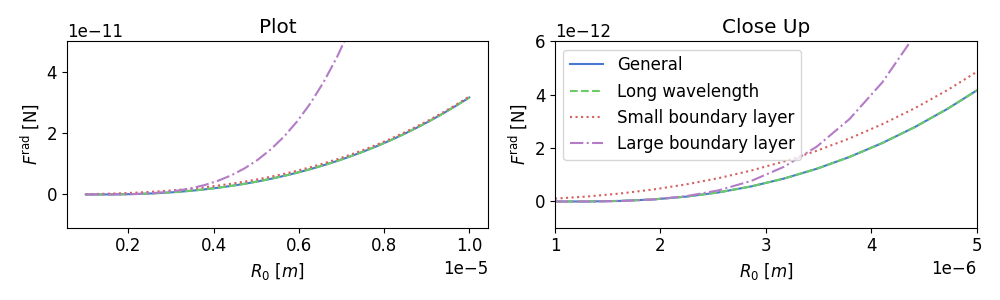
In this example we are going to explain the different option available
to the user when computing the ARF using the models doinikov1994rigid
and doinikov1994compressible. These versions make different assumptions
on the relative size of the particle radius \(R_0\), the boundary
layer thickness \(\delta\), and the wavelength \(\lambda\).
Alternatively, the dimensionless wavenumber \(x = k_f R_0\) and the
dimensionless viscous wavenumber \(x_v = k_v R_0\) can be used to
represent the different cases.
The different options are listed in the table below for the model
doinikov1994rigid. The different options are accessible through the
keyword arguments long_wavelength, small_boundary_layer,
and large_boundary_layer in the OSAFT classes for the ARF.
Assumption |
\(x, x_v\)-representation |
|
|
|
no assumptions |
– |
|
|
|
\(\lambda \gg R_0, R_0 \gg \delta\) |
\(|x| \ll 1, |x| \ll |x_v|\) |
|
|
|
\(\lambda \gg R_0 \gg \delta\) |
\(|x| \ll 1 \ll |x_v|\) |
|
|
|
\(\lambda \gg \delta \gg R_0\) |
\(|x| \ll |x_v| \ll 1\) |
|
|
|
For the model doinikov1994compressible there is no long_wavelength
option. If small_boundary_layer or large_boundary_layer is
selected, long wavelength is automatically assumed.
Assumption |
\(x\), \(x_v\)-representation |
|
|
no assumptions |
– |
|
|
\(\lambda \gg R_0 \gg \delta\) |
\(|x| \ll 1 \ll |x_v|\) |
|
|
\(\lambda \gg \delta \gg R_0\) |
\(|x| \ll |x_v| \ll 1\) |
|
|
 99 # General case
100 general_sol = osaft.doinikov1994rigid.ARF(
101     f=f, R_0=R_0,
102     rho_s=rho_cu,
103     rho_f=rho_oil, c_f=c_oil,
104     eta_f=eta_oil,
105     zeta_f=zeta_oil, p_0=p_0, wave_type=wave_type,
106     position=position, long_wavelength=False,
107 )
108 general_sol.name = 'General'
109
110
111 # Long wavelength
112 long_lambda_sol = general_sol.copy()
113 long_lambda_sol.long_wavelength = True
114 long_lambda_sol.name = 'Long wavelength'
115
116 # Long wavelength, small boundary layer
117 small_delta_sol = long_lambda_sol.copy()
118 small_delta_sol.small_boundary_layer = True
119 small_delta_sol.name = 'Small boundary layer'
120
121 # Long wavelength, large boundary layer
122 large_delta_sol = long_lambda_sol.copy()
123 large_delta_sol.large_boundary_layer = True
124 large_delta_sol.name = 'Large boundary layer'
Note that the OSAFT library defaults to the general case, however the small particle solution might often be more sensible to use since it is computationally much more efficient and returns similar results over a wide range of values.
Next, we are going to plot the ARF over a range of values for the particle
radius. Since computing the ARF in the general case requires solving
integrals we are going to set the multicore option to True when
adding solution. This way the ARF for different points are computed in
parallel.
In order for multiprocessing to work you need to run your code inside the
if __name__ == '__main__': clause as shown below.
Check the multiprocessing example.
142 if __name__ == '__main__':
143
144     arf_plot = osaft.ARFPlot('R_0', np.linspace(1e-6, 10e-6, 30))
145
146     arf_plot.add_solutions(
147         general_sol, long_lambda_sol,
148         small_delta_sol, large_delta_sol,
149         multicore=True,
150     )
151
152     fig, ax = plt.subplots(1, 2, figsize=(10, 3))
153
154     arf_plot.plot_solutions(ax=ax[0])
155     ax[0].set_xlabel('$R_0$ $[m]$')
156     ax[0].set_ylim(top=0.5e-10)
157
158     arf_plot.plot_solutions(ax=ax[1])
159     ax[0].set_title('Plot')
160     ax[1].set_title('Close Up')
161     ax[1].set_xlabel('$R_0$ $[m]$')
162     ax[1].set_xlim(left=1e-6, right=5e-6)
163     ax[1].set_ylim(bottom=-1e-12, top=6e-12)
164     ax[0].legend([], frameon=False)
165
166     fig.tight_layout()
167     plt.show()
Total running time of the script: ( 3 minutes 5.334 seconds)
Estimated memory usage: 9 MB